Beverly Hills, California

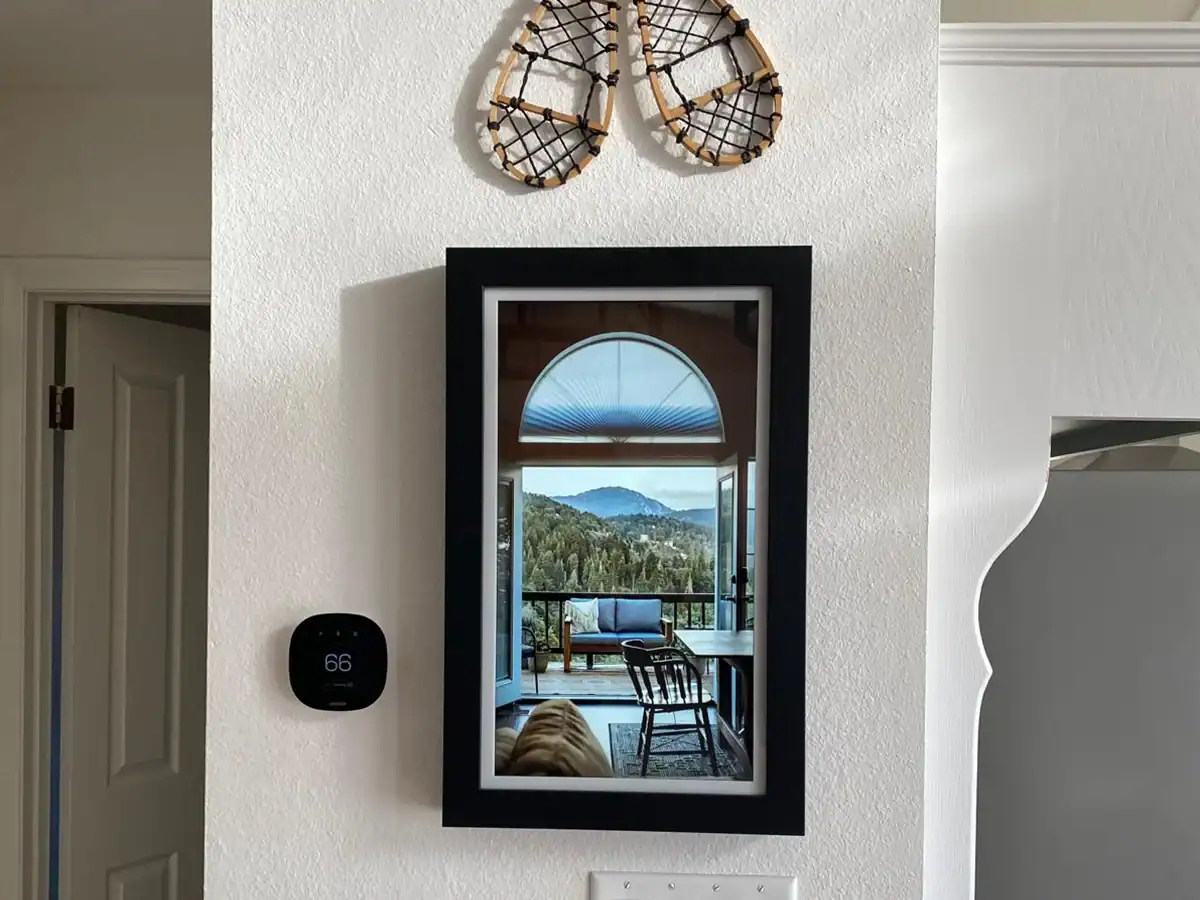
GuideScreen gives vacation rental hosts and property managers the wall-mounted digital concierge guests loved, with a personalized welcome, Wi-Fi QR code, and checkout checklist for every guest.
In 2023, Sharp NEC Display Solutions announced that GuestView Guide would be discontinuing service next year, and the guidebook service shut down for good on October 31, 2024. That left a lot of short-term rental hosts with a screen on the wall and no clear replacement.
We’ve taken the core ideas that made that digital concierge so useful — a large-screen guest welcome, check-in instructions, local recommendations, and checkout feedback — and built on them with a product that’s here to stay, backed by an active support team and continued development.
If you’re looking for a GuestView Guide replacement because your display is no longer supported, GuideScreen offers the same wall-mounted, always-on experience guests love.
Still have your GuestView Guide hardware? Reach out to inquire about your options.
GuestView Guide features reflect the service as it was offered before it was discontinued on October 31, 2024.
| Feature / Specification | GuestView Guide | GuideScreen |
|---|---|---|
| Power Source | Always On (No batteries required) | ✓ Always On (No batteries required) |
| Screen Size | 21.5″ HD Touchscreen | ✓ 21.5″ Full HD Touchscreen |
| Guest Access | No App Download Required | ✓ No App Download Required |
| Property Overview & Manual | ✓ | ✓ |
| Local Recommendations | ✓ | ✓ |
| Checkout Checklist & Feedback | ✓ | ✓ |
| Remote Content Updates | ✓ | ✓ |
| Mounting System | Wall Bracket | ✓ French Cleat (Included) |
| Personalized Guest Welcome with Name | ✓ | ✓ |
| Check-in Sentiment Alert | ✓ | ✓ |
| Still Available | ✗ Discontinued Oct 2024 | ✓ Active, with Ongoing Support |
A paper Airbnb welcome book ends up in a drawer. A digital welcome on the wall doesn’t. GuideScreen stays in view from arrival to departure, so you can give guests the same polished experience every stay.
Arrival
Guests are greeted by name, pulled from your reservation calendar through an iCal link. A quick check-in survey captures first impressions, so you can fix small issues before they show up in guest reviews.
Mid-Stay
Mid-stay questions about the hot tub, the TV, or the Wi-Fi are answered on screen with text, image, and video guides, alongside local attractions, maps, and a 5-day weather forecast.
Checkout
A customized checkout checklist shows guests exactly what to do before they leave, then a rating prompt collects feedback while the stay is still fresh.
Every feature is designed to enhance the guest experience and cut down on repetitive guest communication — no app, no login, and no link to lose.


Many alternatives to GuestView Guide moved the experience onto the guest’s phone. Those tools are strong for pre-arrival communication, but they do a different job from a concierge that lives in the home. Here’s how the main options compare, so hosts and property managers can choose what fits.
Wall-Mounted Digital Concierge
A 21.5″ touchscreen that stays on inside the property, built for hosts who want the in-home experience GuestView Guide offered: a personalized welcome, property guides, local attractions, a Wi-Fi QR code, and a checkout checklist.
Best for: a shared, always-visible concierge throughout the stay.
Phone-Based Digital Guidebook
Touch Stay digital guidebooks are web-based digital guest guides that guests open from a link, with no app download. Touch Stay’s platform also includes guest messaging tools, an upsell widget, and integrations with 30+ PMS platforms, including Hostaway.
Best for: sharing property information before arrival and on the go.
AI Guest Experience Platform
Enso Connect’s Boarding Pass web app combines digital check-in, smart lock access, guest verification, upsells, and digital guidebooks. It can hold back check-in instructions until the rental agreement is signed and a deposit is collected.
Best for: operators who need signed rules and fees before check-in.
Guest Operations Platform
RueBaRue is an AI-powered guest operations platform for vacation rental teams, combining guest messaging, digital Guest Guides, property operations, guest surveys, smart locks, and ID verification, with PMS integrations such as Hostaway, Guesty, and OwnerRez.
Best for: multi-property teams looking to streamline messaging and operations.
GuideScreen works inside the property, so it complements the pre-arrival messages and automated guest emails your PMS or messaging platform already sends. If you need a record that the guest agreed to your house rules and itemized fees before check-in, keep that in a pre-arrival tool, then let GuideScreen take over once guests walk through the door.
Competitor details reflect publicly available information as of September 2026. Features and plans change, so check each provider’s website for the latest.
| Feature / Aspect | Touch Stay (Phone-Based Guide) | GuideScreen Wall-Mounted |
|---|---|---|
| Visibility & Accessibility | Guests open a link on their own device — the guide is only seen when they choose to open it. | Always visible in a common area — no phone, no link, no friction. |
| Ease of Use | Easy to open, but relies on guests remembering to find the link during their stay. | Simple, intuitive interface — no learning curve for any guest. |
| Device Experience | Works on phones, tablets, and laptops, but the experience varies with each guest’s device. | Runs on a dedicated display, so every guest gets the same experience. |
| Shared Experience | Usually viewed individually on personal devices. | Visible to everyone in the room — ideal for groups and families. |
| Guest Engagement | May be overlooked if the guest doesn’t open the link. | Captures attention naturally due to placement and constant visibility. |
| Professional Presentation | Depends on the guest’s screen size and brightness settings. | Polished look that adds to the décor and perceived value of the rental. |
| Host Control | Hosts control the content, but can’t ensure guests actually see it. | Full owner control over what’s displayed and how it functions — right where guests will see it. |
| Upsells & Promotions | Supports upsells, but offers are only seen when guests open the guide. | Always in view — ideal for promoting local partners or late checkout. |
The GuideScreen Admin Console works in any web browser, so rental property managers can update guide content for every property without a site visit, and without reprinting a guest manual every time the Wi-Fi password changes.
Reservations sync through your iCal link, and remote editing and automatic syncing allow hosts to keep every screen current without extra effort. Your team spends less time repeating the same answers and more time on property operations.
“I had GuideScreen adapt a device I already had, and it works perfectly! It even has some features I didn’t have before!”
Evelyn Kryzanowski
Host
“They are introducing new features every few weeks. It’s a great tool to have as a host, especially with the check-in feedback, so I know if there are any issues the guests are having when they first arrive.”
Catherine Roberts
Host
Sharp NEC Display Solutions announced in 2023 that it would discontinue GuestView Guide, and the service shut down on October 31, 2024. Hosts who relied on the wall-mounted screen have been looking for a replacement ever since.
It depends on what you want to replace. If you loved having a screen in the property, GuideScreen is the closest match: a 21.5″ wall-mounted touchscreen with a personalized welcome, property guides, and a checkout checklist. If you mainly need pre-arrival guest communication on the guest’s phone, platforms like Touch Stay, Enso Connect, or RueBaRue are built for that.
Possibly. Reach out with details about your device and our support team will let you know what your options are.
No. GuideScreen is always on inside the property, so guests simply walk up and tap. There’s nothing to download, no link to find, and no login.
They do different jobs. Touch Stay digital guidebooks live on the guest’s phone and can be shared before arrival. GuideScreen lives on the wall, where it’s visible to everyone in the room throughout the stay. If you want guests to have information before they arrive, a phone-based guide makes sense. If you want a shared, always-visible concierge in the home, GuideScreen is built for that.
GuideScreen is designed for the in-stay experience. Keep using your PMS or messaging platform to automatically send guest emails, check-in instructions, and agreements before arrival. GuideScreen takes over once guests are inside.
GuideScreen devices are handcrafted and assembled locally in Beverly Hills, California.
Get in touch and we’ll show you exactly what GuideScreen looks like in a real short-term rental.