
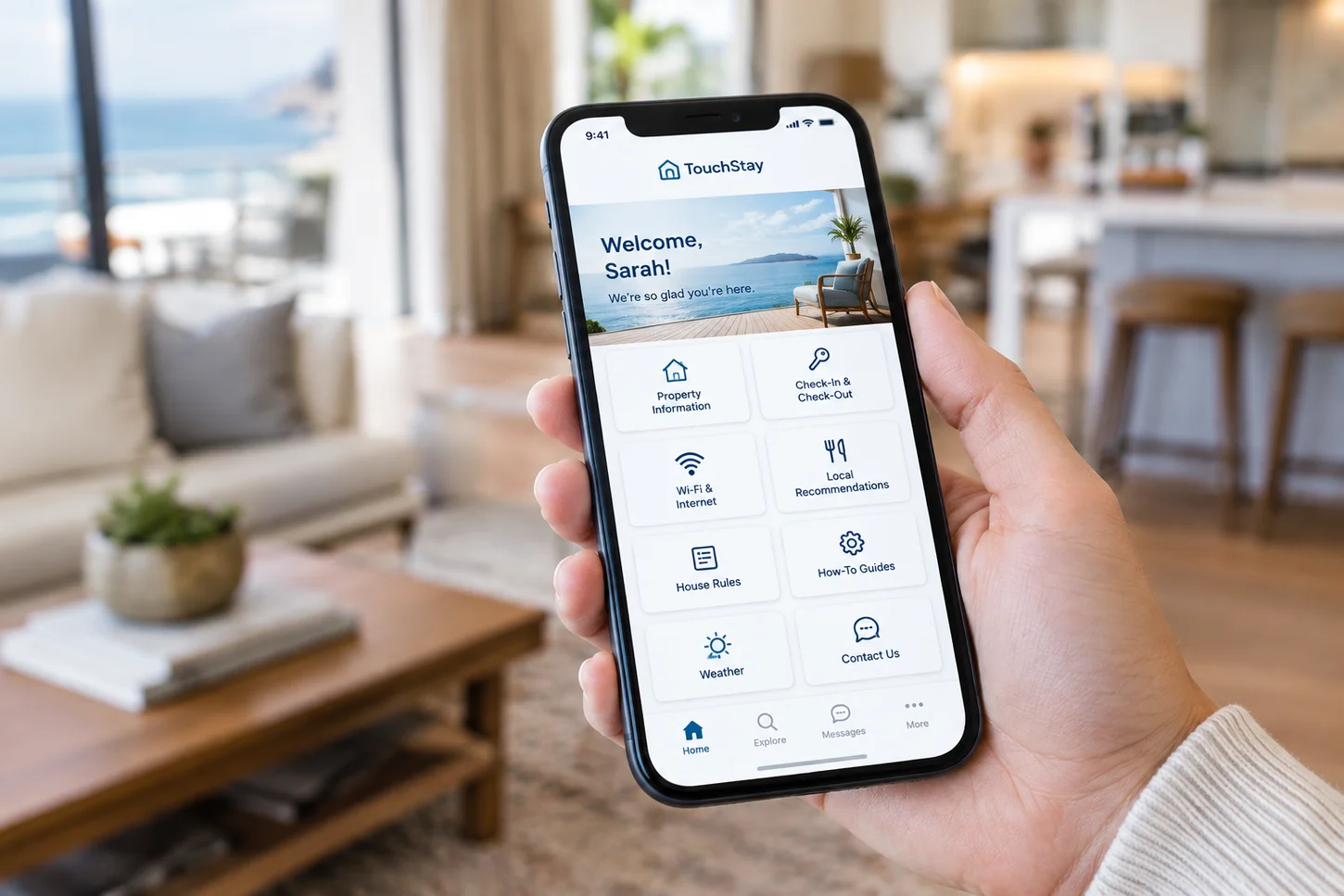
If you’ve been managing vacation rentals for any length of time, you’ve probably heard of TouchStay. It’s one of the best-known digital guidebook platforms in the short-term rental space, and for good reason. It helps hosts consolidate property information into a shareable, mobile-friendly format that guests can access from their phones.
Digital guidebooks have become a standard part of the modern vacation rental experience. A well-built guide can cover everything from check-in instructions and Wi-Fi credentials to house rules, appliance walkthroughs, local recommendations, and checkout procedures. For hosts who previously relied on printed welcome books, or no guide at all, the shift to digital has been a significant improvement.
TouchStay isn’t a bad product. It does what it’s designed to do, and plenty of hosts use it effectively. But hosting needs evolve. Properties grow, guest expectations shift, and what worked in year one may not match where you want to take your property in year three.
Some hosts start looking for alternatives because they want a different kind of guest experience. Others want something physically present inside the property rather than a link tucked inside a pre-arrival email. Some are looking for tighter branding, different integrations, or a simpler setup. And some have noticed that the booking guest receives the guidebook link, but the other three people in the group never open it.
These are legitimate reasons to explore what else is available.
A quick note before we start: this is the GuideScreen blog, and GuideScreen is one of the alternatives covered here. We’ve tried to be straight about where other tools are the better fit. We’d rather you choose the right tool than the wrong one from us.
One of the more notable alternatives takes a fundamentally different approach. While TouchStay is a digital guidebook that guests access through their own devices, GuideScreen is an in-property digital concierge: a 21.5-inch wall-mounted touchscreen installed inside the vacation rental itself. Rather than asking guests to find a link and open it, the screen is simply there when they walk in the door.
That distinction shapes everything that follows. GuideScreen isn’t a feature-for-feature replacement for every TouchStay capability. It’s an alternative for hosts who want to move the guest information experience off the guest’s phone and into the property itself.
This article covers GuideScreen alongside several other TouchStay alternatives, including platform-based options, in-property tablet solutions, and DIY approaches. The goal is to help you find the right fit for your property, your guests, and the experience you want to create.
What Is TouchStay?
TouchStay (officially styled “Touch Stay”) is a digital guidebook platform built for vacation rental hosts, B&Bs, and property managers. If you haven’t used it but are researching alternatives after hearing the name, here’s what it is and how it works.
How TouchStay Works
TouchStay lets hosts create a digital vacation rental guidebook that guests access via a shared link or QR code. The guide is hosted online and viewed on the guest’s own device, typically a smartphone.
Content typically includes property information, local recommendations, check-in and checkout instructions, and house rules. Over time, TouchStay has grown from a guidebook tool into a broader guest experience platform. It now includes an AI guidebook generator, an AI chatbot trained on the host’s guidebook content, built-in upsells, automated messaging, contact collection, and a review prompt. It also connects with 40+ property management systems, channel managers, and hospitality tools, so guidebooks can be sent automatically when a booking comes in.
Why Vacation Rental Hosts Use TouchStay
TouchStay addresses a real pain point for hosts: the printed welcome book is impractical to maintain and easy for guests to miss. A digital guidebook solves both problems. It’s always accessible, easy to update, and doesn’t require printing or replacing.
Hosts managing multiple properties particularly benefit from centralized content management. When house rules change or a new appliance gets installed, the update goes into one platform rather than into a stack of physical binders spread across different units.
The platform also reduces repetitive questions. When guests know where to find information, they’re less likely to message the host asking for the Wi-Fi password or checkout time. That’s a genuine time-saver, especially at scale.
Because guides can be shared before guests arrive, they help with preparation and reduce confusion on arrival day. For hosts who want a clean, organized digital resource that travels in the guest’s pocket, TouchStay delivers on that premise.
Where TouchStay May Not Be the Right Fit
This isn’t a criticism of TouchStay. It’s a reflection of the fact that different hosts have different needs, and some of those needs point toward a different approach.
The core model of a mobile guidebook means the experience depends on the guest opening it. The booking guest receives the link, but the partner, kids, or friends staying at the property may never see it. Even when a guest has the link, a guidebook competes for attention with everything else on their phone.
Some hosts want a focal point for guest information inside the property: something visible from across the room that the whole group encounters naturally. For those hosts, a phone-based guide, no matter how well designed, isn’t quite what they’re looking for.
There’s also the question of how the guest experience feels. A link in an email is functional. A screen on the wall that greets guests by name when they arrive is something else. Hosts competing on guest experience, particularly at the luxury end of the market, may find that a mobile guidebook doesn’t fully reflect the level of hospitality they want to project.
None of this makes TouchStay the wrong choice universally. It makes it the wrong choice for some hosts, and that distinction is worth understanding before you start evaluating alternatives.
Why Are Vacation Rental Hosts Looking for TouchStay Alternatives?
The intent behind most searches for TouchStay alternatives isn’t “I need a cheaper version of the same thing.” More often, hosts have run up against a specific limitation or a shift in how they think about the guest experience. These are some of the most common reasons.
You Want Something More Than a Mobile Guidebook
A digital guidebook and a digital concierge are related but different concepts. A guidebook is a document: a well-organized collection of information that guests can reference. A concierge is a presence. It’s something guests interact with, something that surfaces relevant information at the right moment, and something that acknowledges the guests specifically.
An in-property information display takes this further by making the information part of the physical space. It doesn’t depend on a guest remembering to open a link, and it doesn’t get buried under notifications.
For some hosts, the next step isn’t finding another guidebook app that does more of the same thing. It’s reconsidering where and how guests encounter property information in the first place.
You Want Guest Information Available Inside the Property
Think about the moments during a stay when guests actually need information. Not before they arrive, but when they’re standing in front of an unfamiliar appliance, trying to figure out the TV, or wondering what the checkout procedure is.
At that moment, the information is most useful right there in the property, not buried in a pre-arrival email. This applies to:
- Wi-Fi credentials
- Parking details
- HVAC and thermostat instructions
- Hot tub and outdoor amenity setup
- TV and entertainment system walkthroughs
- Kitchen appliance guides
- House rules and quiet hours
- Checkout procedures
- Local restaurant and activity recommendations
- Real-time local weather
You Want to Reach the Entire Guest Group
This is one of the more underappreciated limitations of a link-based guidebook. When a host sends a digital guide, it goes to the booking guest. That one person may read it thoroughly, share it with the group, or simply forget to mention it exists.
A screen inside the property is visible to everyone. The couple who didn’t book, the friends who joined later, the teenagers who would never think to ask: they all encounter the same information because it’s right there in the room.
This is the distinction we built GuideScreen around. A mobile guidebook reaches one person’s phone, while an in-property screen reaches the whole group throughout the stay. We cover the secondary guest problem in more detail in a separate article.
For group properties, large cabins, or any rental where multiple guests need to find the same information independently, that difference changes how useful the guide actually is.
You Want a More Premium Guest Experience
There’s a growing segment of vacation rental hosts, particularly those managing luxury properties, design-forward cabins, boutique beach houses, and high-end rural retreats, for whom presentation is not an afterthought.
These hosts understand that the guest experience starts the moment the guest walks in the door and forms an impression. A physical touchscreen displaying a personalized welcome message with the guest’s name isn’t just functional. It signals that the host has invested in the experience.
For properties competing on guest experience rather than price, the difference between “there’s a QR code on the fridge” and “there’s a screen that welcomed us by name” is the kind of detail that shows up in five-star reviews.
You Want to Move Beyond the Traditional Welcome Book
Guest information in vacation rentals has followed a fairly predictable path: printed binder, then PDF sent by email, then mobile-accessible digital guidebook. Each step solved the problems of the previous format without necessarily rethinking the underlying model.
The next stage for some properties isn’t a better mobile guidebook. It’s a different delivery mechanism entirely, built into the property rather than accessed through the guest’s device. We compare printed vs. digital welcome books for Airbnbs in a separate guide, but in-property digital concierge solutions represent a shift beyond both.
This isn’t a universal industry progression. Plenty of hosts will continue to use mobile guidebooks effectively for years. But for those who want to take the next step, in-property screens are a meaningfully different approach.
The Best TouchStay Alternatives for Vacation Rental Hosts
TouchStay alternatives fall into several categories, each suited to a different type of host and a different set of priorities:
- Dedicated digital guidebook platforms: Software-only alternatives that offer a similar mobile guidebook experience
- Property management platforms with built-in guidebooks: PMS ecosystems where the guidebook is one component of a broader toolset
- Guest experience platforms: Tools that bundle the guidebook with messaging, upsells, and guest data. TouchStay itself has moved in this direction, and RueBaRue leans this way with its SMS tools
- In-property digital concierge solutions: Hardware and software combinations that bring the guest information experience inside the property
- DIY options: Free or low-cost alternatives built with general-purpose tools
The alternatives below represent a range of these categories, selected for meaningful differentiation rather than simply filling a list.
1. GuideScreen: Best TouchStay Alternative for an In-Property Digital Concierge
What Is GuideScreen?
GuideScreen is an American company that builds and manages a wall-mounted digital concierge designed specifically for vacation rentals. It is not a mobile app or a SaaS guidebook platform. It’s a physical device: a 21.5-inch HD touchscreen installed inside the rental property.
The screen greets guests by name when they arrive and remains available throughout the stay as a source of property information, local recommendations, weather, and guidance. Hosts manage content remotely through a browser-based admin dashboard, so information can be updated across one property or a whole portfolio without an on-site visit.
Features include:
- Personalized guest welcome screen
- Arrival sentiment check with instant host alerts
- Check-in information and house rules
- Wi-Fi credentials (with scannable QR code for instant connection)
- Appliance and how-to video guides
- Local restaurant and activity recommendations
- 5-day local weather forecast
- Maps and nearby locations
- Checkout checklist
- Private checkout rating
- iCal sync for automatic guest names and booking dates, including rich iCal feeds from major PMSs
- Remote content management from any browser
We built GuideScreen as a dedicated in-home digital concierge: something physically present in the property, not an app competing for attention on a guest’s phone.
How GuideScreen Differs From TouchStay
| TouchStay | GuideScreen | |
| Primary format | Mobile-first digital guidebook and guest platform | In-property digital concierge |
| Access method | Link or QR code on guest’s device | Dedicated touchscreen in the property |
| Who sees it | Whoever opens the link | Everyone staying at the property |
| Availability | Guest must locate the link and open it | Screen is always visible and accessible |
| Guest experience | Phone-based information reference | Physical + digital property experience |
| Pre-arrival use | Guide can be shared before check-in | In-property only; not a pre-arrival tool |
| Booking sync | 40+ direct PMS and channel integrations | iCal sync, including rich iCal from major PMSs |
| Upsells | Built in | Not a core feature |
| Hardware required | None | 21.5″ wall-mounted touchscreen, maintained by GuideScreen |
GuideScreen’s Personalized Welcome Experience
One of GuideScreen’s more distinctive features is its ability to greet guests by name when they arrive. Through iCal sync, the system pulls the guest’s name from the reservation and displays a personalized welcome message on the screen.
For guests, this creates a different kind of first impression, one that signals genuine hospitality rather than a generic check-in. For hosts managing properties remotely, it recreates a small piece of the personal touch that’s often missing from keyless, self-service stays.
Arrival Sentiment Check
Shortly after arrival, the screen prompts guests for a quick rating of their first impressions. If something isn’t right, the host gets an instant alert and can fix it while the guest is still settling in, rather than reading about it in a public review days later. Catching an issue early is far less costly than recovering from a bad Airbnb review.
GuideScreen also invites guests to rate their stay privately before checkout, giving hosts honest feedback while it’s still useful. Arrival feedback isn’t unique to GuideScreen (YourWelcome offers an arrival rating, and TouchStay has a review prompt), but on a wall-mounted screen it becomes part of the natural flow of walking into the property.
GuideScreen’s Property Information
The in-property screen displays a comprehensive range of property-specific information, organized for easy access during a stay:
- Wi-Fi: Credentials displayed clearly, plus a scannable QR code so guests can connect without typing a password
- House rules: Available throughout the stay, not just in a pre-arrival email guests may have skimmed
- Appliance instructions: Walkthroughs for TV, HVAC, hot tub, fireplace, kitchen appliances, washer and dryer, and smart home features
- How-to videos: Video guides for property amenities, accessible directly on the screen
- Parking and access information: Available at the moment guests need it
- Checkout checklist: Step-by-step checkout tasks so guests know exactly what to do before they leave
- Property amenities: An overview of what the property includes and how to use it
Local Recommendations and Weather
The guest home screen includes curated local recommendations and a 5-day weather forecast for the property’s area. Hosts add their own handpicked selections, such as restaurants, coffee shops, grocery stores, attractions, outdoor activities, and family-friendly options, with personal notes rather than generic listings.
Guests get recommendations from someone who actually knows the area, in a format that’s easy to browse at any point during their stay. Built-in maps help them find their way to nearby grocery stores, pharmacies, and attractions without asking.
GuideScreen’s iCal Integration
GuideScreen syncs reservation data through iCal. Hosts connect their Airbnb, Vrbo, Booking.com, or property management calendar once, and the screen picks up guest names and stay dates automatically. Rich iCal feeds from property management systems such as Hospitable, Guesty, Hostaway, OwnerRez, and Lodgify carry additional booking details, like check-in times.
It’s worth being precise about this: the sync is iCal-based rather than a direct API connection with each PMS. For most hosts, that covers what the screen needs. Operators who want deeper two-way PMS workflows, such as upsell payments or automated messaging tied to the guidebook, should factor that into the comparison.
In practice, hosts don’t need to update the welcome message between guests. When the calendar updates, the screen updates.
GuideScreen Hardware and Design
The hardware is a core part of the product, not an afterthought. GuideScreen uses a 21.5-inch HD commercial display in a gallery-style frame, available in Oak and Satin Black finishes. The design intent is to blend into the property’s interior rather than look like office equipment or a digital sign.
The screen is assembled in Los Angeles, runs 24/7, and has no batteries to charge or devices to go missing. It ships with a custom flush-mount kit designed for installation by a local AV professional or handyman, and GuideScreen maintains the hardware once it’s in place.
For design-forward properties, the physical presence of the screen is part of the value. A well-placed digital concierge becomes a natural feature of the space rather than something guests have to notice or seek out.
Who Should Choose GuideScreen Over TouchStay?
GuideScreen is a strong fit for hosts who:
- Want a premium, in-property guest experience rather than another mobile app
- Manage luxury, design-forward, or high-end vacation rentals
- Want the entire guest group, not just the booking guest, to have easy access to information
- Want a visible guest-experience amenity that’s part of the property itself
- Need appliance and how-to video guides available inside the home
- Want guests greeted by name on arrival
- Want to hear about problems at check-in rather than in a review
- Manage remote properties where reducing support calls is a priority
Who Might Prefer TouchStay?
To be direct, TouchStay may remain the better choice for hosts who:
- Primarily want a mobile digital guidebook that guests access from their phones
- Need to share property information with guests before arrival
- Want built-in upsells and an AI chatbot
- Rely on specific direct PMS integrations that TouchStay supports
- Prefer a software-only solution with no hardware to install
- Manage properties where wall-mounting a screen isn’t practical or permitted
GuideScreen and TouchStay are built around different delivery models. Neither is universally better; they serve different hosting needs.
Coming from GuestView Guide? That wall-mounted concierge was shut down in October 2024. We cover the best GuestView Guide alternative in a separate guide.
2. Hostfully Guidebooks: Best for Hosts Already Using a PMS Ecosystem
What Is Hostfully?
Hostfully offers both a full property management platform and a standalone digital guidebook product. It’s aimed primarily at professional property managers and hosts running larger portfolios, though individual owners use it as well.
Hostfully Digital Guidebooks can include property details, videos, maps, local recommendations, AI-generated itineraries, and add-on services sold through a built-in upsell marketplace. The broader value, however, comes from integration with the rest of the Hostfully ecosystem: the PMS, guest messaging, channel management, and Hostfully’s smart-device tools all live in one place. Hostfully’s first digital guidebook is free, which makes it easy to test.
Hostfully vs. TouchStay
| Feature | TouchStay | Hostfully |
| Core offering | Digital guidebook and guest platform | PMS + digital guidebook |
| Guidebook type | Mobile-accessible link/QR | Mobile-accessible link/QR |
| PMS functionality | No (integrations available) | Yes, native PMS |
| Guest communication | Automated messaging | Native guest messaging |
| Multi-property management | Yes | Yes, core feature |
| Upsells | Yes | Yes (upsell marketplace) |
| Automation | Yes (auto-send, scheduled messaging) | Extensive |
| Channel integrations | Yes | Yes |
For hosts who already use Hostfully’s PMS, the guidebook is a natural extension of a system they’re already working in. For hosts who only want a guidebook, the broader PMS may be more than they need.
Who Should Choose Hostfully?
Hostfully is best suited to:
- Professional property managers running larger portfolios
- Hosts who want or already have a full PMS setup
- Operators who want guidebooks, guest communication, and booking management in one place
- Hosts who need robust automation and multi-channel integration
- Those already invested in the Hostfully ecosystem
Potential Reasons to Choose Something Else
Hostfully’s strength is its breadth, which is also a potential drawback. Hosts who simply want a guest guide without a full property management platform may find it more than necessary. Owners who want a dedicated physical guest experience inside the property will find better options elsewhere.
3. YourWelcome: Best for Vacation Rentals That Want an In-Property Tablet
What Is YourWelcome?
YourWelcome is a London-based guest technology company built around an in-property tablet. Each subscription includes an 8-inch tablet per property, set on a stand inside the rental, with free hardware replacement if it’s broken or stolen.
The tablet gives guests property information, video guides, local guides, and a personalized welcome pulled from booking data via PMS integrations such as Guesty and OwnerRez. Guests also rate their stay on arrival, and hosts are alerted if a score falls below a set threshold. Its pre-arrival product, YourWelcome Advance, handles advance check-in and automated pre-arrival emails, so YourWelcome covers both before and during the stay.
Upselling is central to the platform. Guests can book late checkout, equipment hire, and other services directly through the tablet, which makes it a strong option for operators who want to generate ancillary revenue from their technology.
YourWelcome vs. TouchStay
| Feature | TouchStay | YourWelcome |
| Access method | Guest’s own device | In-property tablet plus pre-arrival links |
| Physical hardware | No | Yes (8″ tablet with stand) |
| Guidebook content | Full guidebook | Property info, video guides, local guides, services |
| Upsells | Yes | Yes, core feature |
| Guest engagement | Link-based | In-property device |
| Pre-arrival use | Yes | Yes (pre-arrival check-in and emails) |
YourWelcome vs. GuideScreen
Both YourWelcome and GuideScreen put a physical device inside the vacation rental, which immediately sets them apart from mobile-first platforms like TouchStay. The differences between the two matter for hosts weighing in-property options.
| YourWelcome | GuideScreen | |
| Hardware format | 8″ tablet on a stand | 21.5″ wall-mounted display |
| Installation | Tabletop, movable | Wall-mounted, permanent |
| Design intent | Guest technology device | Gallery-frame concierge display |
| Finish options | Standard tablet aesthetic | Oak / Satin Black frame |
| Upsells | Core feature | Not a core feature |
| Pre-arrival tools | Yes | No; in-property only |
| Personalized welcome | Yes, via PMS sync | Yes, via iCal sync |
| Arrival feedback | Instant arrival rating | Arrival sentiment check with instant alerts |
| Target property type | Broad | Luxury / design-forward |
The core difference is how each product sits in the property. A tablet on a stand reads as a device: useful and functional, but recognizably a piece of technology. A 21.5-inch wall-mounted display becomes part of the room, more like a property feature than a piece of guest equipment. For hosts where aesthetic continuity matters, that distinction is meaningful.
YourWelcome’s stronger upsell and pre-arrival tools make it a better fit for operators who want to actively monetize the guest journey. GuideScreen’s focus is more squarely on the in-stay experience: information, personalization, and the quality of the arrival moment.
Who Should Choose YourWelcome?
YourWelcome works well for:
- Operators who want to generate upsell revenue from an in-property device
- Hosts who want pre-arrival check-in and in-stay tools from one provider
- Properties where a portable, repositionable tablet fits better than a wall-mounted screen
- Properties where permanent wall installation isn’t feasible
4. RueBaRue: A Dedicated Digital Guidebook Platform With Two-Way SMS
What RueBaRue Does
RueBaRue is a vacation rental guest communication and digital guidebook platform. Hosts create home guides covering check-in and checkout times, door codes, Wi-Fi, house rules, and safety information, along with area guides for dining, activities, events, and essentials. Guests access everything via link or QR code on their own devices, with no app or hardware required.
RueBaRue’s standout is text messaging. Its message scheduler sends guidebooks, satisfaction surveys, and other messages by text or email on the dates you choose. Its smart messaging is two-way: guests can text you or your team before, during, and after the stay, and every conversation is saved in a shared team inbox.
Key features include:
- Home guides and area guides accessible via link and QR code
- Two-way SMS messaging with a shared team inbox
- Scheduled text and email messages
- Alerts to current and arriving guests about local disruptions such as storms, fires, and road closures
- Guest portal with booking-specific information
- Extended-stay upsells
- PMS integrations, including Guesty and OwnerRez
How RueBaRue Compares With TouchStay
Both platforms operate on the same fundamental model: a mobile-accessible guidebook delivered via link or QR code. The primary differentiator is RueBaRue’s SMS functionality. For hosts who want guests to be able to text a real number and get a reply from their team, RueBaRue offers that natively.
TouchStay’s AI features, including AI-assisted guidebook creation and an AI chatbot, give it the edge in automated content generation and instant self-serve answers. Beyond that, the two are broadly comparable on core guidebook features.
Who Should Consider RueBaRue?
RueBaRue is worth evaluating for hosts who:
- Want a dedicated digital guidebook with two-way SMS guest communication
- Prefer text-based guest contact over in-app messaging
- Want a way to alert guests quickly about local disruptions
- Are looking for a TouchStay alternative that stays within the mobile guidebook model
- Don’t need or want in-property hardware
5. DIY Digital Guidebook: Best Free TouchStay Alternative
If you’re managing a single property, running a tight budget, or simply want to test the concept before committing to a dedicated platform, a DIY approach is a viable starting point.
Google Docs or Google Sites
A shared Google Doc is arguably the simplest possible digital guidebook. It costs nothing, works on any device, can be updated instantly, and can be shared via link. Google Sites adds basic formatting and navigation if you want something slightly more polished.
The familiar interface means you’ll spend no time learning a platform. The trade-off is that the result looks like a Google Doc, not a hospitality product.
Notion
Notion has become a popular choice for DIY vacation rental guides because it supports a much more attractive layout than a basic document. Pages can include images, embedded content, toggle sections, and custom formatting. Templates are available, and edits appear immediately for anyone with the link.
For hosts who are already comfortable with Notion, it’s a genuinely good option. For hosts who aren’t, setup takes meaningful time.
PDF Welcome Book
A PDF welcome book is the closest digital equivalent to the printed binder. It’s easy to create, straightforward to email, and can be added to your messaging flow on most booking platforms. It can also be printed as a backup.
The limitation is that PDFs are static. An update means generating and re-sending a new file, or accepting that some guests have an outdated version.
The Downsides of DIY Guidebooks
DIY approaches have real advantages in cost and simplicity, but they come with genuine limitations:
- Manual setup and maintenance: Everything needs to be built, organized, and updated by hand
- No automation: Guest information doesn’t update with reservations, and personalized messaging isn’t possible
- No integrations: No connection to a PMS, booking platform, or calendar
- Presentation ceiling: A Google Doc will always look like a Google Doc
- Guests still have to find it: A DIY guide shares the core limitation of any link-based approach, depending on the guest to open the link and pass it along
For a small operation or a host just getting started, DIY is a perfectly reasonable starting point. As your property count or guest experience ambitions grow, the limitations become more apparent.
TouchStay Alternatives Compared
| Alternative | Best For | Mobile Guide | In-Property Screen | PMS/Integrations | Guest Personalization | Upsells | Best Feature |
| GuideScreen | In-property digital concierge | — | ✓ | iCal (incl. rich iCal from major PMSs) | ✓ | — | Wall-mounted touchscreen with personalized welcome |
| TouchStay | Mobile guidebook and guest platform | ✓ | — | ✓ (40+) | ✓ | ✓ | AI chatbot and auto-sent guidebooks |
| Hostfully | PMS + guidebook ecosystem | ✓ | — | ✓ | ✓ | ✓ | Integrated property management platform |
| YourWelcome | In-property tablet experience | ✓ (pre-arrival) | ✓ (8″ tablet) | ✓ | ✓ | ✓ | In-room tablet with upsells |
| RueBaRue | Mobile guidebook + SMS | ✓ | — | ✓ | ✓ | ✓ (extended stays) | Two-way SMS guest communication |
| DIY | Budget-conscious hosts | ✓ | — | — | Manual | Manual | Low or no cost |
Verify all feature availability with current vendor documentation before making a purchasing decision.
TouchStay vs. GuideScreen: Which Is Better for Your Vacation Rental?
This question comes up often enough that it’s worth addressing directly. The honest answer is that they’re different tools serving different hosting philosophies, and the better one depends on what you’re trying to accomplish.
Choose TouchStay If…
- You want a mobile-first digital guidebook that guests access from their phones
- You need guests to review property information before arrival
- You want built-in upsells, an AI chatbot, or AI-assisted guidebook creation
- You need direct PMS integrations beyond iCal
- You prefer a software-only solution with no hardware
Choose GuideScreen If…
- You want a permanent physical digital concierge inside the rental
- You want guests to encounter property information the moment they walk in the door
- You want a premium installation that suits a high-end or design-forward property
- You want guests greeted by name and a heads-up if their first impression isn’t great
- You want appliance and how-to videos, local recommendations, and weather on a dedicated in-property display
- You want to improve the guest experience at your vacation rental in a way guests can see and feel
Can You Use TouchStay and GuideScreen Together?
Yes, and because the two products don’t do the same thing, they don’t necessarily compete.
Some hosts use a mobile guidebook for pre-arrival communication, sending the link when the booking is confirmed so guests can review check-in instructions before they travel. Once guests arrive, the in-property screen takes over with the personalized welcome, property guides, local recommendations, and everything else guests need during their stay.
This approach uses each tool where it’s strongest: mobile guides before arrival, in-property screens during the stay. If you’re invested in a mobile guidebook platform and want to add an in-property layer, the two can coexist.
How to Choose the Right TouchStay Alternative
The comparison table and product breakdowns above narrow the field, but the right choice ultimately depends on your property and your hosting operation.
Consider How Guests Access Information
Ask yourself when guests actually need the information you’re providing. Pre-arrival? They need a mobile-accessible guide they can review before they travel. During the stay? They need information available inside the property at the moment they need it. Both? You may want a layered approach.
Consider Whether Everyone in the Group Can Access It
Think about who’s actually staying at your property. If it’s a couple, mobile guidebook access is fairly straightforward: one person reads it, the other hears about it. If it’s a group of six, a family reunion, or a corporate retreat, the assumption that “the booking guest will share the link” starts to feel fragile.
Consider Your Property Type
| Property Type | Guidebook Priority |
| Single Airbnb apartment | Mobile guidebook often sufficient |
| Vacation cabin | In-property screen adds value |
| Luxury vacation rental | In-property experience valued |
| Beach house | Group access important |
| Large vacation home | Multiple guests benefit from in-property screen |
| Multi-property portfolio | Remote management and consistency matter |
| Professional property manager | PMS integration may be the priority |
Consider Your Existing Technology Stack
Before switching platforms, review what you’re already using:
- PMS: If you’re deeply integrated with a specific PMS, check whether alternatives connect directly or through iCal
- Smart locks: If your access management integrates with your current guidebook, a switch may affect that workflow
- Guest messaging: If your automated messages include a guidebook link, those will need updating
- Wi-Fi and network: In-property screens need a stable internet connection, so verify your property’s network before committing to hardware
Consider the Guest Experience You Want to Create
There’s a practical version of this question and a strategic one. The practical version: do guests get the information they need without having to contact you? The strategic version: what do you want guests to feel when they arrive and move through your property?
For hosts who want to create memorable guest experiences that lead to repeat bookings and strong reviews, the experience guests have when they walk in the door matters as much as the content of the guidebook.
Consider Hardware vs. Software
The hardware vs. software distinction is one of the clearest dividing lines in this category.
Software-only platforms:
- No physical installation
- Accessible before and during the stay
- Depend on the guest’s own device
- Work well when guests engage with them
Dedicated hardware solutions:
- Always present in the property
- Shared by the entire guest group
- Highly visible, so guests don’t have to seek them out
- Not dependent on guest device behavior
- Require installation, with hardware upkeep varying by provider (GuideScreen maintains its own hardware)
- Create a physical hospitality presence
Neither model is inherently superior. They reflect different philosophies about where guest information belongs and who’s responsible for making it accessible.
What Should a Vacation Rental Digital Guidebook Include?
Whether you’re switching platforms or building a guide for the first time, it’s worth knowing what a comprehensive vacation rental guidebook should cover. These are the sections guests actually use.
Check-In Information
- Arrival instructions and timing
- Door lock code or keyless entry instructions
- Parking details and any permits required
- Entry procedures (gate codes, elevator, unit access)
- Nearest drop-off point for larger groups or luggage
Wi-Fi Information
- Network name and password
- Secondary network if available
- Basic troubleshooting for connection issues
- QR code for instant connection where supported
House Rules
- Quiet hours
- Smoking and vaping policy
- Pet policy
- Party and event restrictions
- Maximum occupancy
- Safety information (fire extinguisher location, emergency exits, carbon monoxide detectors)
Appliance and Property Instructions
- TV setup and streaming service access
- HVAC and thermostat controls
- Hot tub setup, temperature, and maintenance rules
- Fireplace instructions and safety
- Washer and dryer operation
- Kitchen appliance guides
- Garbage disposal and recycling instructions
- Smart home devices (locks, lights, thermostats)
Local Recommendations
- Restaurants (breakfast, lunch, dinner, coffee)
- Grocery stores and convenience options
- Outdoor activities and trails
- Family-friendly attractions
- Local experiences worth seeking out
- Pharmacies and urgent care locations
Checkout Information
- Checkout time
- Trash and recycling procedures
- Dish washing or dishwasher instructions
- Towel and linen handling
- Thermostat setting at departure
- Locking up and returning keys or codes
- Anything specific to the property (parking permits to return, door codes to clear)
Emergency and Important Information
- Property manager contact details
- After-hours emergency contact
- Maintenance request process
- Local emergency services
- Nearest hospital or urgent care facility
- Utility shut-off locations (water, gas, electrical panel)
How to Switch From TouchStay to an Alternative
If you’ve already decided to move on from TouchStay, a structured approach makes the transition smoother and reduces the risk of guests arriving with outdated instructions.
Audit Your Existing TouchStay Guidebook
Before you set up a new platform, document everything that’s currently in your TouchStay guide:
- [ ] Property information and key details
- [ ] House rules
- [ ] Check-in instructions
- [ ] Wi-Fi credentials
- [ ] Appliance and how-to instructions
- [ ] Photos and videos
- [ ] Local recommendations
- [ ] Checkout instructions
- [ ] Emergency and important contacts
Capturing this in a working document gives you a source of truth to build from rather than rebuilding from memory.
Separate Essential Information From Nice-to-Have Content
Not everything in your current guide is equally important. Prioritize what guests actually need (Wi-Fi, check-in, appliances, checkout) and treat local recommendations and extras as a second pass. Getting the essentials right first reduces the risk of a content gap during the transition.
Choose the Right Replacement
The type of alternative you choose should match the reason you’re switching:
- You want a different mobile guidebook: Choose another dedicated digital guidebook platform, such as RueBaRue
- You want PMS integration: Evaluate an ecosystem platform, such as Hostfully
- You want an in-property experience: Evaluate a hardware solution, such as GuideScreen or YourWelcome
- You want to reduce costs: Consider a DIY approach, such as Google Sites or Notion
Update Your Guest Communications
This step is easy to overlook. Your TouchStay link likely appears in several places:
- Automated pre-arrival messages in your PMS or booking platform
- Saved message templates in Airbnb or Vrbo
- Email sequences
- Printed QR codes in the property
- Any in-property signage that references the guide
Work through each of these before going live with the new solution. A guest who follows an old link to a deactivated guide is a preventable problem.
Test the New Guest Experience Yourself
Before the first real guest arrives, walk through the experience as if you were checking in cold:
- Arrive at the property
- Look for the information (pretend you don’t know where it is)
- Find the Wi-Fi credentials
- Find the check-in instructions
- Try to figure out a key appliance using only the guide
- Find local restaurant recommendations
- Find the checkout instructions
If you hit friction at any of these points, so will your guests. Fixing it before they arrive is much easier than addressing it after a review has been posted.
Frequently Asked Questions About TouchStay Alternatives
What Is the Best Alternative to TouchStay?
The best alternative depends on what you need from your guest information experience:
- GuideScreen: For an in-property digital concierge with a dedicated wall-mounted touchscreen
- Hostfully: For guidebooks integrated into a full PMS ecosystem
- YourWelcome: For an in-property tablet with upsells and pre-arrival tools
- RueBaRue: For a mobile guidebook with two-way SMS guest communication
- DIY (Google Sites, Notion, PDF): For budget-conscious hosts with simple setups
There isn’t a single best alternative for every host. The right choice is the one that matches how your guests use information and how you want your property to be experienced.
Is There a Free Alternative to TouchStay?
Yes. The most practical free options are:
- Google Sites: Basic but functional and free
- Google Docs: Simple and familiar, easy to share via link
- Notion: Better formatting than Google Docs, with a free tier that covers most personal use
- PDF: Easy to create and distribute, though updates require re-sending
It’s also worth knowing that TouchStay currently advertises its own free plan with monthly usage limits, and Hostfully’s first digital guidebook is free. Plans change often, so check current vendor details before deciding.
Is GuideScreen a TouchStay Alternative?
Yes, but they work differently. TouchStay is a mobile digital guidebook platform that guests access on their own devices via a link or QR code. GuideScreen is an in-property digital concierge with a dedicated wall-mounted touchscreen installed inside the vacation rental.
They serve related but different functions, and some hosts use both.
Is GuideScreen Better Than TouchStay?
Neither product is universally better. They’re built around different models of delivering guest information.
GuideScreen is a better fit for hosts who want an in-property guest experience rather than another mobile guidebook. TouchStay is a better fit for hosts who primarily want a mobile-accessible guide they can send before arrival, with upsells and an AI chatbot built in.
The question to ask isn’t “which has more features?” It’s “where do I want guests to encounter property information, and who do I want to be able to access it?”
What Is the Best Digital Guidebook for Airbnb?
“Best” varies based on property size, the number of units you manage, your PMS, your guest experience goals, and your budget. For Airbnb hosts specifically:
- Single property, mobile focus: A dedicated guidebook platform (TouchStay, RueBaRue) or DIY
- Multiple properties, PMS needed: Hostfully or a similar ecosystem platform
- Single property, premium experience: GuideScreen for an in-property concierge
- Budget-conscious, just starting out: Google Sites or Notion
Airbnb’s own messaging tools can handle some basic information delivery, but a dedicated guidebook platform or in-property screen goes significantly further.
Do Vacation Rental Guests Still Use Digital Guidebooks?
Yes, with an important caveat: a digital guidebook is only as useful as the likelihood that guests actually open it. Platforms that deliver information via link or QR code depend on guest behavior. In-property screens place the information where guests encounter it naturally, without requiring any action on their part.
In our experience, accessibility matters as much as content. Information that’s easy to find gets used. Information that requires remembering a link, finding it in an email, and opening it on a phone often gets skipped.
Can I Replace My TouchStay Guidebook With a Digital Concierge?
A digital concierge changes the delivery mechanism rather than simply moving the same guidebook into a different app. GuideScreen, for example, presents the information on a screen guests see when they arrive, personalized with their name and showing weather and local guides in a format that invites browsing rather than searching.
If your guests don’t seem to engage with your guidebook, switching to another link-based platform may not change much. Changing where the information lives might.
The Part That Actually Matters: What Kind of Experience Are You Creating?
It’s tempting to evaluate guest information tools as if they’re interchangeable: software with different feature sets and price points. But the choices you make about how guests access property information reflect something more fundamental about the experience you want to create.
A link in an email says: “Here’s what you need. Go find it.” An in-property screen that greets guests by name says: “We knew you were coming, and we made sure everything was ready for you.”
Not every property needs that level of hospitality signaling. A budget apartment on Airbnb may do fine with a straightforward digital guidebook. A luxury cabin in the mountains, a boutique beach house, or a high-end vacation home competing for five-star reviews is a different conversation.
That’s the pattern we see with the hosts we work with: guests engage with information more readily when it’s visible inside the property, and the personalized welcome sets the tone for the rest of the stay. Hosts using GuideScreen have reported 55% fewer guest inquiries and 60% fewer support messages. A digital concierge for vacation rentals doesn’t just deliver information; it changes the tone of the entire arrival.
So the question worth sitting with before you pick your next platform isn’t “which TouchStay alternative has the best feature list?” It’s “what do I want my guests to feel when they walk through the door?”
Final Verdict: Which TouchStay Alternative Is Right for You?
Choose GuideScreen if you want a premium in-property guest experience with a dedicated wall-mounted touchscreen: one that greets guests by name, flags problems at arrival, and becomes a physical feature of the rental itself.
Choose Hostfully if you want guidebooks as part of a broader property management ecosystem with PMS, automation, and multi-channel management built in.
Choose YourWelcome if you want an in-property tablet with strong upsell features and pre-arrival tools from the same provider.
Choose RueBaRue or another dedicated guidebook platform if your priority is mobile access, SMS communication, and digital guidebook functionality without in-property hardware.
Choose a DIY approach if you have a small operation, a limited budget, and the time to maintain a manual guest guide.
For some hosts, the answer will still be a mobile guidebook. For hosts who want the information to be part of the physical property experience, visible and available to everyone from the moment they arrive, a different kind of solution makes more sense.